
Game night, with standings
Run a game night league with your friends
A game night league turns your regular game night into a season. The same teams meet on the same night each week, every result counts toward the standings, and the season ends with a champion: whoever tops the table, or the winner of a finals day. All it takes is a game, a night, a few teams and someone to keep track.
Rival Nights keeps track. The commissioner sets up the season in 8 short steps and invites everyone by email; the app handles the schedule, scores, standings and playoffs. Everyone plays from their phone's browser, with nothing to download.
Your first league is free.
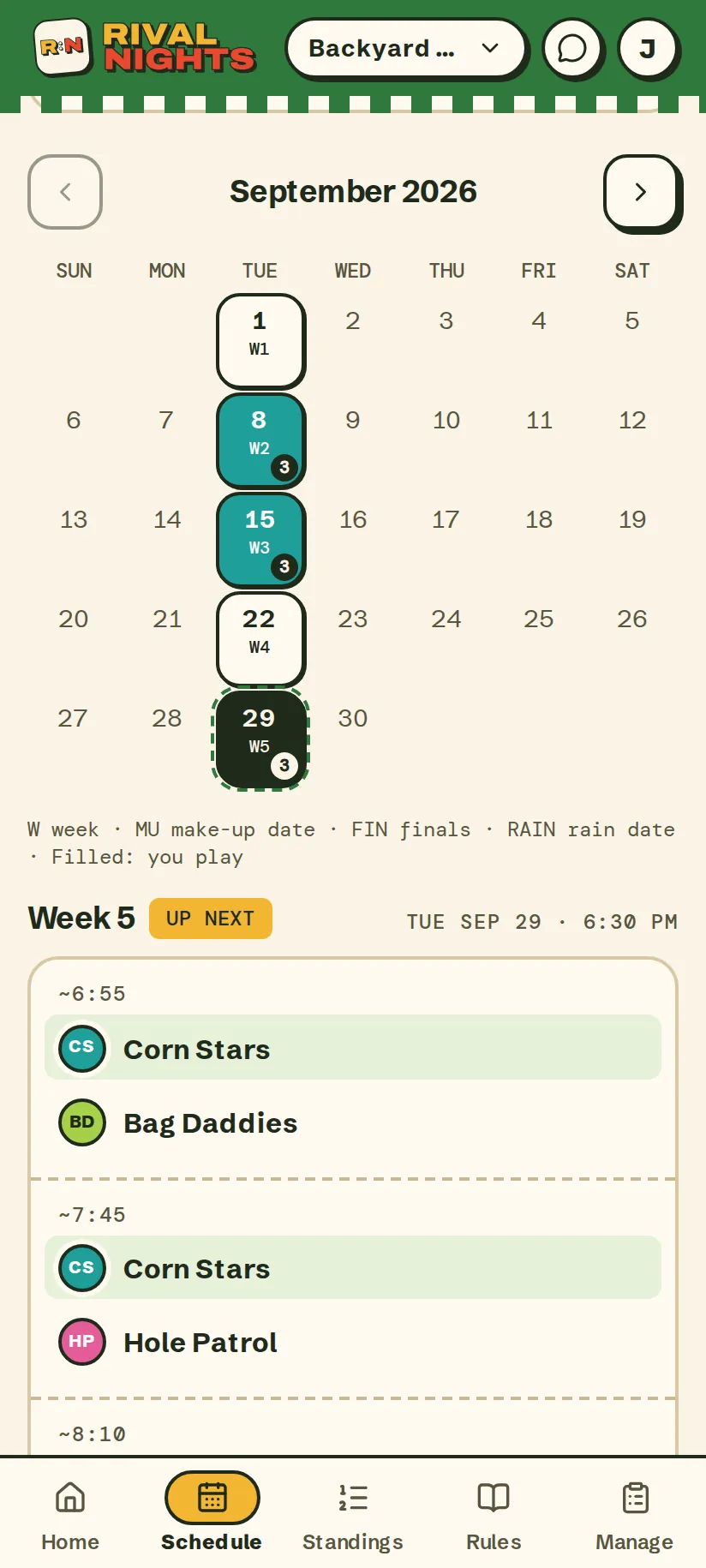
How a season runs
Weekly league nights, or one big day.
You pick the shape when you set up the league. A season gives every team a run of games and a reason to show up next week. A tournament settles it in one afternoon.
Not sure which fits your crew? Our guide on how to start a league with your friends walks through the choice, step by step.
A season of league nights
- Play on the same night every week, for as many weeks as you pick.
- Start with a kickoff day for bragging rights if you like. Those games don't count toward the standings.
- Keep a make-up date after the last week for games that got moved, and a rain date as a backup.
- Finish with a finals day for the top teams, seeded from the standings, or let the standings crown the champion.
A one-day tournament
- One day, one knockout bracket, no regular season. Lose and you're out.
- Seed the teams yourself or draw them at random. Top seeds get byes.
- Add a 3rd-place game, with 4 teams or more, so the semifinal losers play once more.
- Hold a rain date, and the bracket moves there if the weather doesn't cooperate.
What Rival Nights does
The admin, handled.
For the commissioner
- Set up the season in 8 short steps: the game, the dates, nights off, the format, the rules and the teams.
- Get schedule options built for your teams and courts, with a make-up date and a rain date held in reserve.
- Invite teams by email, or let the first ones to say yes take the spots, with a waitlist only you can see.
- Rained out? Cancel the night, and its games get new nights proposed automatically.
- Fix a result, approve a make-up or swap a player when you need to.
For the players
- Sign in with a 6-digit code from email. No password, no app store.
- See your next game first, with the time and place.
- Enter the score after the game, or keep score live. The other team confirms it, or it counts on its own after 24 hours.
- Can't make a night? Bring a sub, skip the week or forfeit. A skipped game gets a make-up night proposed for both teams.
- Get a reminder email 3 days out and another on the day, or subscribe in Apple Calendar, Google Calendar or Outlook.
- Follow standings that do their own math, a league feed for the trash talk, and share cards for the group chat.
Friends and family can follow along too, without an account, when the commissioner turns on spectators. See it all on real screens in the product tour.
The games
Bring your own game.
Any game where two teams or two players face off works. Six come built in, each with its own scoring, game length and starter house rules for the commissioner to edit. Teams can have 1 to 6 players.
Cornhole
Games to 21 · 20-minute time cap · teams of 2
Pickleball
Best of 3 games · 45-minute time cap · teams of 2
Ping pong
Best of 3 games · 30-minute time cap · one-on-one
Darts
Best of 5 legs · 30-minute time cap · one-on-one
Bocce
Games to 12 · 30-minute time cap · teams of 2
Kubb
Just who won · 30-minute time cap · teams of 2
Something else
Name it and pick how it's scored: first to a score, best of a few games, lowest score wins or just who won.
Questions
Before you rally the crew.
How do I get in?
Anyone can start a league: sign in with your email and set one up in a few minutes. Players join through their commissioner's invite email.
What does it cost?
Your first league is free, one per person. After that, a season costs $3 a player and never more than $60 ($36 for 12 players). A one-day tournament costs $1 a player and never more than $40. The commissioner covers it, often out of league money, or on a season of up to 20 players everyone can chip in their own $3 from the league page.
Is there a plan for people who run a lot of leagues?
Yes. The organizer plan is $39 a month or $300 a year, and every league and tournament you publish while it's active needs no season pass, so your players never pay. It covers up to 10 leagues running at once, each with up to 200 players. It renews automatically until you cancel; cancel any time on your profile and it runs to the end of the period you paid for, with no refund for part of one.
Do players have to pay?
Only if the commissioner picks “Everyone chips in,” which is offered on seasons of up to 20 players. Then each player pays their own $3 by card from the league page, and joining the league never waits on it. Otherwise the commissioner covers the pass, and can fold it into the league money they collect.
Can I pay for it out of league money?
Yes. When you cover the pass, setup offers to add each player's part of it to the league money you're collecting. A 40-player tournament's $40 pass adds $1 a player.
What if someone doesn't chip in?
Spots still unpaid when the first night starts become the publishing commissioner's to cover, and until they do, scores and the schedule are paused. Any unpaid spots, before or after the first night, also mean they can't publish another paid league, run that one back, or delete their account until they're paid.
Can I get a refund?
Not usually. Season pass payments are final, including when a league is cancelled or ends early, or a player leaves. Two exceptions: if two payments cover the same spot, we refund the extra one to the card it came from, and if we stop running Rival Nights, we refund passes for seasons that haven't started.
Do players need to download anything?
No. Rival Nights runs in the phone's browser. Players sign in with a 6-digit code from their email, so there's no password to forget.
Which games does it handle?
Any game where two teams or two players face off. Cornhole, pickleball, ping pong, darts, bocce and kubb come set up with their own scoring. For anything else, name it and pick how it's scored: first to a score, best of a few games, lowest score wins, or just who won.
What if I don't have everyone's email?
Add a teammate by first name only. They count on the team, and a teammate enters their scores. Add their email any time to send them an invite.
Someone can't make a night. Now what?
They tap “Can't make it?” and Rival Nights proposes a make-up night that works for both teams. The other team can pick another night within 48 hours.
Can friends and family follow along?
Yes. Turn on spectators and anyone with the link can read the schedule, standings and results without an account. They never see email addresses.
Somebody has to start the league. Might as well be you.
Set it up tonight, send the invites, and the season is on everyone's calendar before the group chat finishes arguing.
Your first league is free. Then $3 a player per season, never more than $60, and on a season of up to 20 players your crew can split it.